
Multi-Modal Content Processing with strands agents and FAISS Memory
🇻🇪🇨🇱 Dev.to Linkedin GitHub Twitter Instagram Youtube Linktr
{% embed https://dev.to/elizabethfuentes12 %}
GitHub repositorie: Strands Agent Samples
Part 2: Adding Persistent Memory with FAISS
In our Multi-Modal Content Processing with Strands Agent and just a few lines of code, we explored how to build a multi-modal AI agent capable of processing images, documents, and videos using the Strands Agent framework. Today, we’re taking it a step further by adding persistent memory capabilities using FAISS (Facebook AI Similarity Search) to create an agent that can remember and recall information across sessions.
🧠 Why Memory Matters
- Contextual conversations: “Remember that architecture diagram I showed you yesterday? How does it relate to this new document?”
- Progressive learning: Building knowledge over time from multiple interactions
- Personalized responses: Tailoring answers based on your previous preferences and content
- Cross-session continuity: Maintaining context even after restarting your application
🚀 What We’re Building
We’ll enhance our multi-modal agent with:
- FAISS-powered memory storage using the
mem0_memorytool - Persistent information storage across sessions
- Smart retrieval of relevant memories based on context
- Memory management operations (store, retrieve, list)
🛠️ Setting Up the Enhanced Agent
Let’s start by configuring our agent with memory capabilities:
import boto3
from strands.models import BedrockModel
from strands import Agent
from strands_tools import image_reader, file_read, mem0_memory, use_llm
from video_reader import video_reader

# Enhanced system prompt with memory instructions
MULTIMODAL_SYSTEM_PROMPT = """ You are a helpful assistant that can process documents, images, and videos.
Analyze their contents and provide relevant information. You have memory capabilities and can remember previous interactions.

You can:
1. For PNG, JPEG/JPG, GIF, or WebP formats use image_reader to process file
2. For PDF, csv, docx, xls or xlsx formats use file_read to process file
3. For MP4, MOV, AVI, MKV, WebM formats use video_reader to process file
4. Just deliver the answer

Memory capabilities:
- Store new information using mem0_memory tool (action="store")
- Retrieve relevant memories (action="retrieve")
- List all memories (action="list")
- Provide personalized responses

Key Rules:
- Always include user_id={USER_ID} in tool calls
- Be conversational and natural in responses
- Format output clearly
- Acknowledge stored information
- Reference relevant past interactions when appropriate
"""

# Configure Amazon Bedrock
session = boto3.Session(region_name='us-west-2')
bedrock_model = BedrockModel(
    model_id="us.anthropic.claude-3-7-sonnet-20250219-v1:0",
    boto_session=session,
    streaming=False
)

# Create enhanced agent with memory capabilities
multimodal_agent = Agent(
    system_prompt=MULTIMODAL_SYSTEM_PROMPT,
    tools=[image_reader, file_read, video_reader, mem0_memory, use_llm],
    model=bedrock_model,
)
💾 Memory Operations in Action
1. Storing Initial User Context
First, let’s store some basic information about our user:
USER_ID = "eli_abc"  # Generate a unique user ID
content = """Hello, my name is Elizabeth, but they call me Eli. I'm a developer advocate at AWS,
and I want to understand what's in images, videos, and documents to improve my day-to-day work."""

# Store user context in memory
multimodal_agent.tool.mem0_memory(action="store", content=content, user_id=USER_ID)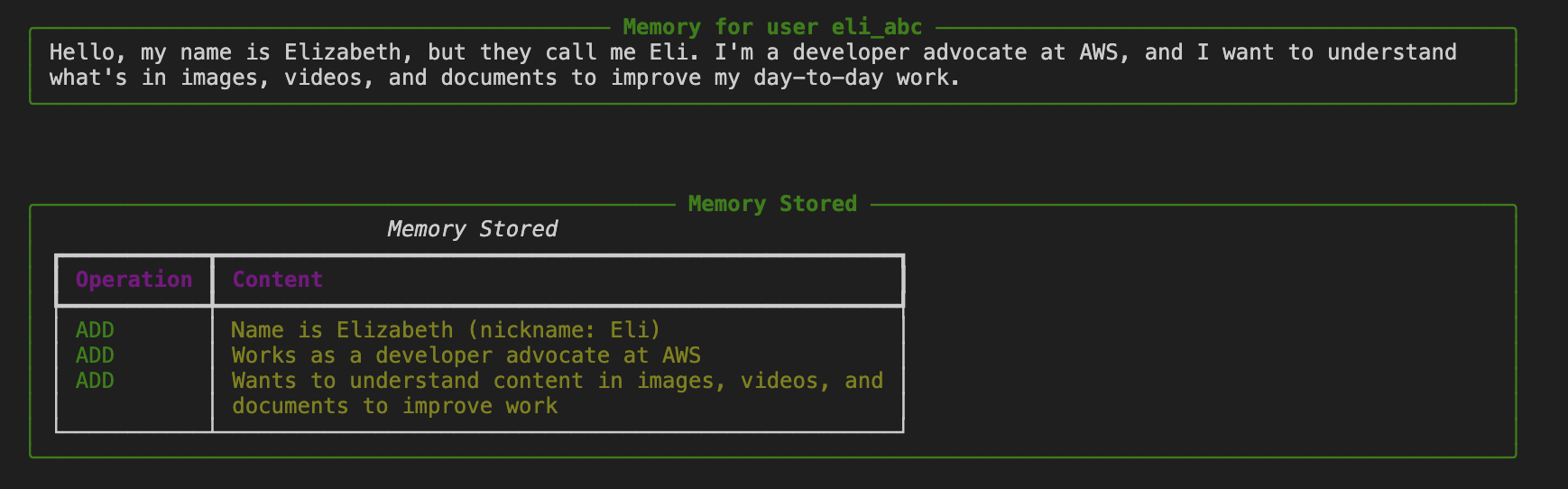
2. Image Analysis with Memory Storage
Now let’s analyze an image and automatically store the results:
print("=== 📸 IMAGE ANALYSIS WITH MEMORY ===")
image_result = multimodal_agent(
    f"Analyze the image data-sample/diagram.jpg in detail and describe everything you observe. "
    f"Remember this information for later. USER_ID: {USER_ID}"
)
print(image_result)
The agent will:
- Process the image using
image_reader - Analyze the architectural diagram
- Automatically store the analysis in memory using
mem0_memory - Provide a detailed description

3. Video Analysis with Memory
Let’s process a video and store its content:
print("=== 🎬 VIDEO ANALYSIS WITH MEMORY ===")
video_result = multimodal_agent(
    "Analyze the video data-sample/moderation-video.mp4 and describe in detail "
    "the actions and scenes you observe. Store this information in your memory."
)
print(video_result)
4. Document Processing with Memory
Process and remember document content:
print("=== 📄 DOCUMENT ANALYSIS WITH MEMORY ===")
doc_result = multimodal_agent(
    "Summarize as json the content of the document data-sample/Welcome-Strands-Agents-SDK.pdf "
    "and store this information in your memory."
)
print(doc_result)
🔍 Memory Retrieval and Management
Retrieving Specific Memories
# Retrieve memories related to a specific query
retrieved_memories = multimodal_agent.tool.mem0_memory(
    action="retrieve",
    query="What services are in the image?",
    user_id=USER_ID
)
print("Retrieved Memories:", retrieved_memories)
Listing All Stored Memories
# List all stored memories for the user
all_memories = multimodal_agent.tool.mem0_memory(
    action="list",
    user_id=USER_ID
)
print("All Stored Memories:", all_memories)
Testing Cross-Modal Memory Recall
The real power comes when testing memory across different media types:
print("=== 🧠 MEMORY RECALL TEST ===")
memory_result = multimodal_agent(
    "What do you remember about the image, video, and document I showed you earlier?"
)
print(memory_result)
🎯 Real-World Use Cases
This memory-enhanced agent opens up numerous practical applications:
1. Technical Documentation Assistant
- Remember architecture diagrams, code snippets, and documentation
- Provide contextual answers based on your project history
- Track changes and evolution of your technical designs
2. Content Analysis Pipeline
- Process batches of images, videos, and documents
- Build a knowledge base of analyzed content
- Generate reports based on accumulated insights
3. Personal Knowledge Management
- Store and recall information from various media types
- Create connections between different pieces of content
- Build a personalized AI assistant that grows with your needs
4. Educational Content Processing
- Analyze educational materials across different formats
- Remember student preferences and learning patterns
- Provide personalized learning recommendations
🚀 Getting Started
-
Clone the repository:
git clone https://github.com/elizabethfuentes12/strands-agent-samples) cd notebook -
Install dependencies:
pip install -r requirements.txt -
Configure AWS credentials for Bedrock access
-
Try the notebook:
multi-understanding-with-memory.ipynb
The combination of Strands Agent’s multi-modal capabilities with persistent memory creates a foundation for building intelligent, context-aware applications that can truly understand and remember your content.
📚 Resources
- Strands Agent Documentation
- Part 1: Basic Multi-Modal Processing
- Complete Code Examples
- AWS Bedrock Documentation
- Getting Started with Strands Agents
Stay tuned for more Strands Agent implementations!
Gracias!
🇻🇪🇨🇱 Dev.to Linkedin GitHub Twitter Instagram Youtube Linktr
{% embed https://dev.to/elizabethfuentes12 %}